Advertisement
Safaricom explains new M-Pesa verification feature after concerns
Sunday 08th February, 2026 12:06 PM|

Safaricom has clarified the reason behind a new M-PESA feature requiring customers to re-enter the recipient’s phone number twice during transactions, following complaints from users.
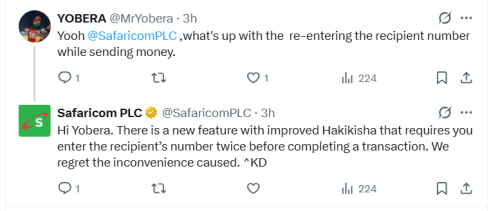
The issue gained attention on X when user Yobera (@MrYobera) asked: “Yooh @SafaricomPLC, what’s up with re-entering the recipient number while sending money.”
Safaricom responded, saying that it has introduced a new, improved Hakikisha feature that now requires users to enter the recipient’s phone number twice before completing a transaction, noting that the change may cause inconvenience.
“Hi Yobera. There is a new feature with improved Hakikisha that requires you enter the recipient’s number twice before completing a transaction. We regret the inconvenience caused,” Safaricom’s response on X.
You Might Also Like



The enhanced Hakikisha feature, rolled out in December 2025, primarily affects transactions via the M-PESA SIM Toolkit (STK). It builds on the original Hakikisha service launched in 2015, which displayed the recipient’s registered name for verification.
The update aims to curb erroneous transfers, a problem that previously resulted in thousands of daily reversal requests and financial losses for users. Reports indicate that similar confirmation steps have already reduced daily wrong-send reversals significantly.
Balancing security and convenience
While the extra step has frustrated some users who find it time-consuming, others acknowledge its role in preventing costly mistakes. One X user humorously noted missing out on occasional “wrong number” windfalls.
Analysts say the feature reflects Safaricom’s ongoing efforts to improve transaction security while maintaining convenience for millions of M-PESA users who rely on the platform for daily payments.
Automatic deductions through M-PESA ratiba
In recent weeks, Safaricom has faced similar queries about automatic deductions without PIN prompts. On January 12, 2026, user @UCollince asked: “Good morning, @SafaricomPLC. Kindly explain how @_shakenya is able to deduct money from our M-Pesa accounts without prompting us to enter our PIN. This started happening after we registered for the Lipa Mdogo Mdogo service.”
Safaricom explained that such deductions occur only if users have activated M-PESA Ratiba, a standing order service launched in October 2024. “If you have activated M-PESA Ratiba… and enabled SHA to auto deduct, this can happen without prompting for the PIN,” the company said.
M-PESA Ratiba allows recurring payments for bills, rent, school fees, insurance, subscriptions, or upkeep, with easy setup and automatic transfers. Users enrolled in SHA’s Lipa Mdogo Mdogo plan may experience auto-deductions if Ratiba is enabled. To manage or cancel, dial *334# > Option 9 (M-PESA Ratiba) > Manage Standing Order.
Safaricom says these updates strengthen security and automate routine payments on M-PESA, Kenya’s leading mobile money platform, while prompting discussions on the balance between convenience and control.
Author
Latest News




Advertisement
More on Business