Safaricom explains what to do if your encrypted M-Pesa statement won’t open
By Mustafa Juma, July 22, 2026Safaricom has explained what customers should do if they are unable to open their encrypted M-Pesa statements after one customer reported failing to receive the SMS verification code required to unlock the password-protected PDF.
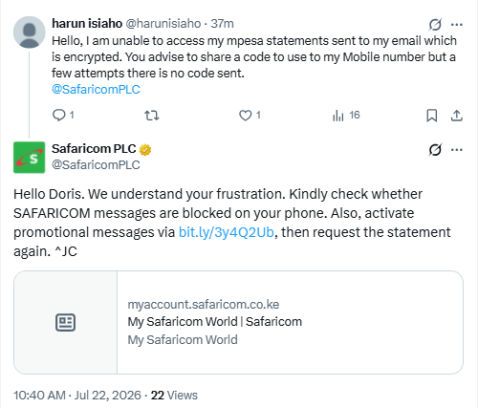
The clarification came after X user Harun Isiaho (@harunisiaho) complained that although he had successfully requested his M-Pesa statement via email, he could not access it because the password code was never sent to his phone.
“Hello, I am unable to access my M-Pesa statements sent to my email, which is encrypted. You advise to share a code to use to my mobile number, but after a few attempts, there is no code sent,” the customer wrote.
Safaricom’s response
Responding to the complaint, Safaricom advised the customer to first check whether messages from the SAFARICOM sender had been blocked on the handset.
The telecommunications company also recommended enabling promotional SMS messages before requesting a fresh statement.
“We understand your frustration. Kindly check whether SAFARICOM messages are blocked on your phone. Also, activate promotional messages via https://bit.ly/3y4Q2Ub, then request the statement again,” Safaricom responded.
The company directed the customer to update the promotional messaging settings before generating another statement.
Why M-Pesa statements are encrypted
Safaricom has previously explained that M-Pesa statements are intentionally password-protected as part of its customer data protection measures.
According to the company, the password prevents unauthorised individuals from accessing sensitive transaction histories if the email containing the statement is intercepted or accessed by someone else.
Once a customer successfully requests a statement, Safaricom generates two separate items:
- A password-protected PDF statement delivered to the registered email address.
- A separate SMS containing the unique password needed to open that specific statement.
Each newly generated statement receives its own unique password.
How to request an M-Pesa statement
Customers can request M-Pesa statements through several self-service channels.
Using USSD, customers dial *334#, select My Account, then M-Pesa Statement, choose the preferred statement period, enter their email address and authenticate the request using their M-Pesa PIN. Alternatively, statements can also be generated through the M-Pesa app.
Safaricom allows customers to request statements covering periods of up to two years through its self-service channels. Older statements or those required for legal proceedings are processed through Safaricom Shops after identity verification.
What to do if the password SMS doesn’t arrive
Based on Safaricom’s latest guidance, customers experiencing difficulties opening their emailed statements should:
- Check whether SMS messages from the SAFARICOM sender are blocked.
- Ensure promotional messages are enabled.
- Submit a fresh statement request if necessary.
- Match the password SMS with the corresponding statement email, since each request generates a different password.
Growing focus on customer support
The latest clarification is part of a series of customer support responses Safaricom has issued in recent weeks through its official social media channels.
The company has recently explained how customers can reverse unauthorised M-Pesa GlobalPay deductions, what to do after sending money to the wrong PayBill number and why M-Pesa statements are password-protected.
Safaricom has also continued reminding customers never to share confidential information such as their M-Pesa PIN, one-time passwords (OTPs) or statement passwords with third parties, saying these security features remain critical in protecting users against fraud and unauthorised access to financial information.