Safaricom explains how to stop annoying pop-up messages after every call
By Mustafa Juma, July 28, 2026Safaricom has explained how customers can disable persistent flash messages and end-of-call notifications after one subscriber complained that the pop-ups continued appearing despite following the company’s previous instructions.
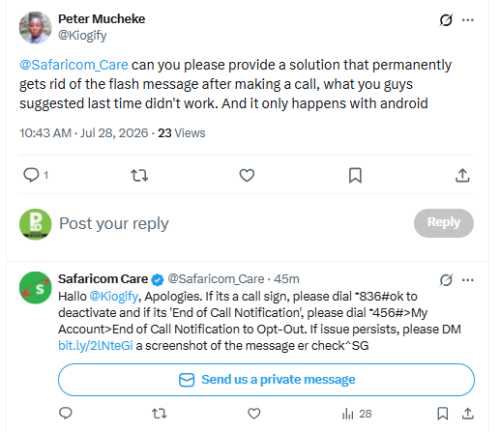
The issue came to light after X user Peter Mucheke (@Kiogify) publicly appealed to the telecommunications giant for a permanent solution in a statement shared on Tuesday, July 28, 2026.
“@Safaricom_Care, can you please provide a solution that permanently gets rid of the flash message after making a call, what you guys suggested last time didn’t work. And it only happens with Android,” the customer posted.
The complaint resonated with other subscribers who have previously reported receiving pop-up messages immediately after ending phone calls, particularly on Android devices.
Safaricom offers opt-out steps
Responding through its customer care account, Safaricom apologised for the inconvenience and outlined two methods customers can use to disable the notifications, depending on the type of message they receive.
“If it’s a Call Sign, please dial 836# OK to deactivate and if it’s ‘End of Call Notification’, please dial *456# > My Account > End of Call Notification to Opt-Out. If the issue persists, please DM us a screenshot of the message for further check,” the company said.
The telco indicated that subscribers experiencing continued notifications after following the self-service steps should contact customer care for additional troubleshooting.
What are the notifications?
Safaricom’s end-of-call notifications typically appear immediately after a voice call ends and may display information such as airtime balance, promotional offers or links to other services.
Call Sign notifications, on the other hand, are service messages that may appear after calls depending on a customer’s subscription settings.
While some users find the alerts useful, others have long complained that they interrupt normal phone use, especially when they appear after every outgoing or incoming call.
Android users raise concerns
The latest complaint also highlighted what the customer described as an issue affecting Android users more frequently.
Although Safaricom did not confirm whether the problem is Android-specific, the company acknowledged the complaint and advised customers to seek further assistance if the standard opt-out process does not resolve the issue.
Technology experts note that some flash messages are generated through SIM Toolkit applications, while others originate from network-based value-added services, meaning the method for disabling them can vary depending on the service involved and the handset being used.
Growing customer engagement on social media
Safaricom has increasingly used its X customer care platform to resolve subscriber concerns ranging from M-PESA transactions and SIM card issues to My OneApp login challenges and network-related complaints.
The company frequently responds by providing self-service solutions through USSD codes before escalating unresolved issues through direct messages.
The latest exchange underscores how social media has become an important customer support channel, allowing subscribers to seek quick assistance while also drawing attention to recurring issues affecting large numbers of users.