Safaricom explains why My OneApp keeps logging you out on Wi-Fi
By Mustafa Juma, July 25, 2026Safaricom has clarified why some customers, particularly those living abroad, may experience repeated logouts when using the My OneApp over Wi-Fi.
The telco says the behaviour is part of the app’s built-in security verification process.
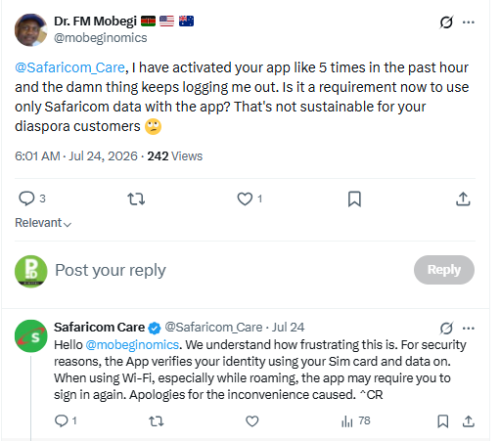
The explanation came after an X user, identified as @mobeginomics, complained that the application had logged him out multiple times within a short period despite repeatedly activating it.
“@Safaricom_Care, I have activated your app like 5 times in the past hour and the damn thing keeps logging me out. Is it a requirement now to use only Safaricom data with the app? That’s not sustainable for your diaspora customers,” the user wrote on X on Friday, July 24, 2026.
Safaricom cites security checks
Responding to the complaint, Safaricom said the issue is linked to the app’s identity verification mechanism rather than a technical fault.
“Hello @mobeginomics. We understand how frustrating this is. For security reasons, the App verifies your identity using your SIM card and data on. When using Wi-Fi, especially while roaming, the app may require you to sign in again. Apologies for the inconvenience caused,” the company said.
The response indicates that customers using foreign Wi-Fi networks or roaming services may experience more frequent authentication requests compared to users accessing the application through Safaricom mobile data in Kenya.
In April 2026, Safaricom issued an apology to customers following a poor service experience after implementing changes to the My OneApp, explaining the reasons behind the commissioning of the changes, which had drawn outrage online from various users.
Why verification matters
My OneApp gives customers access to sensitive services, including M-PESA, airtime purchases, account management, bundles, home internet services and customer support.
Because the platform allows users to manage financial transactions and personal account information, Safaricom employs multiple layers of authentication designed to verify that the person accessing the account is the legitimate subscriber.
Using the Safaricom SIM card and mobile data enables the application to authenticate a customer’s identity more seamlessly through the mobile network.
However, when a customer connects via Wi-Fi, particularly while outside Kenya, the application may require additional login verification because it cannot rely on the same network-based authentication.
Diaspora users raise concerns
The explanation is likely to resonate with many Kenyans living abroad who frequently rely on Wi-Fi instead of mobile data while accessing Safaricom services.
Several diaspora customers have previously raised concerns about repeated login requests, verification challenges and difficulties accessing certain services while roaming internationally.
For many users, Wi-Fi remains the most affordable internet option outside Kenya, making repeated logouts an inconvenience, especially for those who regularly use M-PESA to send money home or manage local accounts.
Growing focus on digital security
Safaricom has in recent years strengthened security across its digital platforms amid rising cases of cybercrime, SIM swap fraud and account takeover attempts targeting mobile money users.
The company has progressively introduced stronger authentication measures across M-PESA and its digital applications to protect customers from unauthorised access.
While the additional security checks may occasionally inconvenience legitimate users, particularly those outside the country, the operator maintains that they are intended to safeguard customer accounts and financial transactions.
The latest clarification comes as Safaricom continues encouraging customers to keep their applications updated and to use official login channels whenever accessing My OneApp or M-PESA services.